
IBM Think published a profile by Sascha Brodsky on how I use AI in my daily research at IBM and in my teaching at Columbia. The piece is here on IBM Think [1]. What follows is the longer first-person version: which tools I use and why, how dataflow hardware changes the PyTorch stack, and where these systems still need a domain expert to verify them.
The tools I use, and why
Claude was the most surprising. I started using it as an experiment, to help me understand large open-source codebases. The kind with hundreds of thousands of lines of code written by other people. I did not expect to keep using it. I did, and it changed how quickly I can move from an unfamiliar codebase to a useful conversation about it.
Over time my work changed into a set of AI tools, each used for a different kind of work. Claude, ChatGPT, and Gemini are not interchangeable for me. Inside IBM, I recently started using Bob and its command-line interface Bobshell for working with internal codebases [6].
I no longer think about these tools as a ranked list. They are tools for different kinds of work, and I choose based on the kind of work. For long, step-by-step reasoning over a complex codebase or system, I use Claude. For quick exploration of an unfamiliar area, multi-tool workflows, and first-pass synthesis, I use ChatGPT. When context size is the limit, when I need to load very large document sets and reason across them, I use Gemini [7]. For work inside an enterprise codebase, Bob and Bobshell are integrated with the repository in a way a general-purpose model is not.
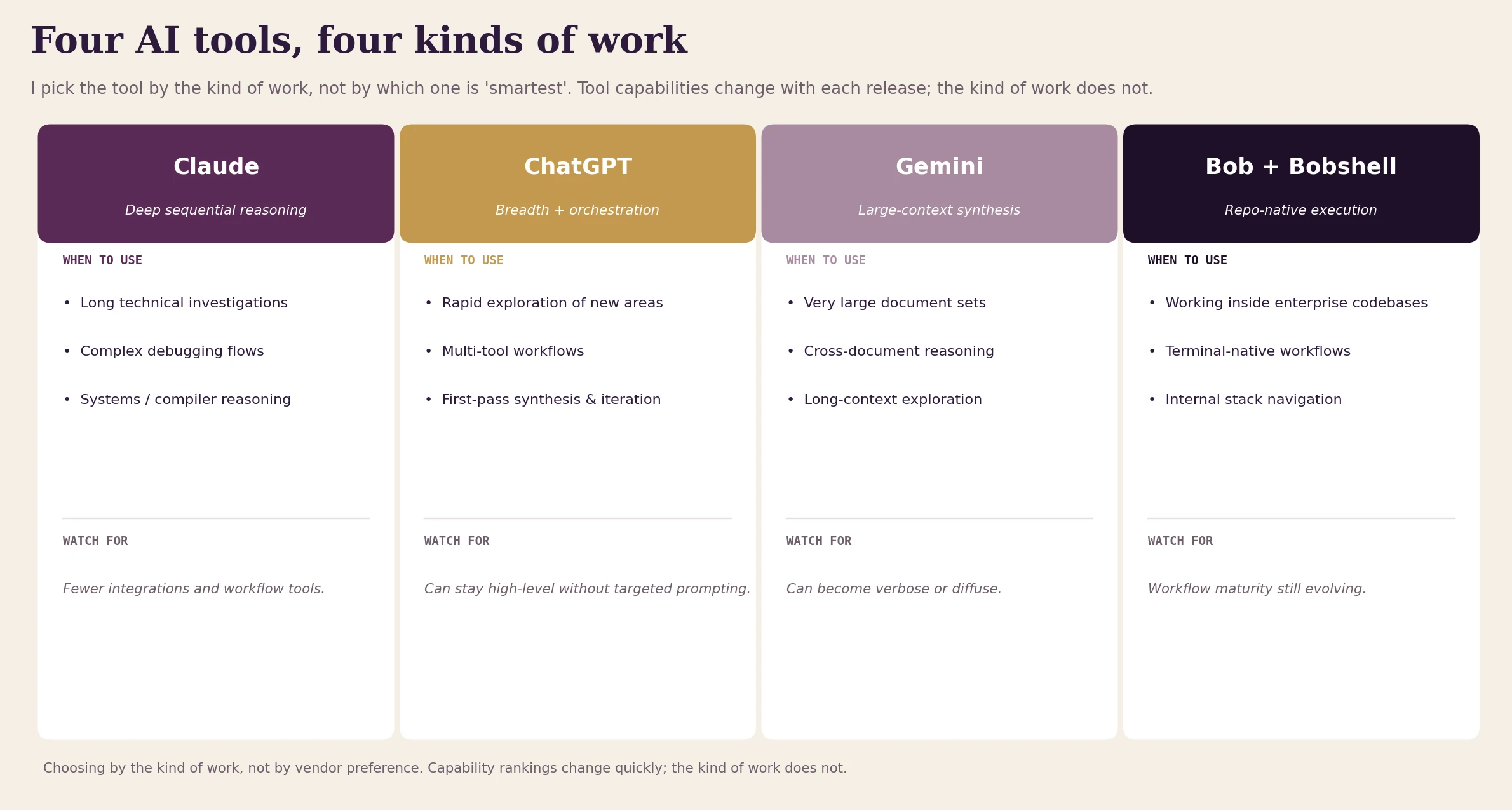 Fig. 1: Four AI tools, four kinds of work. I choose the tool by the kind of work, not by which one is "smartest." Tool capabilities change with each release; the kind of work does not.
Each tool has tradeoffs I have learned through use. Claude has fewer integrations and workflow tools than ChatGPT, which sometimes matters. ChatGPT can stay high-level without targeted prompting; the breadth is real, but you have to prompt it for depth. Gemini can become verbose or unfocused on synthesis if you do not prompt it precisely. Bob is still maturing as a workflow tool.
Knowing those tradeoffs is part of using the tools well. I do not think about which is best in general. I think about which one fits the specific problem in front of me.
Reading research papers
My daily work covers software stack development for IBM's Spyre AI accelerator and broader research into AI hardware [5]. The volume of new work is very high. New papers, new models, new toolchains. Keeping up is hard. Separating signal from noise is harder.
I use Claude, Gemini, and ChatGPT to read deep technical papers. Extracting the key architectural decisions, understanding the tradeoffs the authors made, comparing new work to what I already know. What used to take a full afternoon of careful reading becomes a 30-minute conversation where I can ask questions about the ideas. Why was this design choice made. What did the authors trade away. Where the claims might be overstated.
Reading becomes an active process instead of a one-pass exercise.
This matters most for papers next to my core expertise. Close enough that I need a deep understanding, but far enough that I do not have years of background to rely on. The conversation lets me build that understanding quickly.
The AI accelerator field
A large part of my job is understanding how different hardware architectures (GPUs, TPUs, custom AI ASICs, emerging accelerators) lead to real differences in how software is built and integrated. I use the AI tools together to compare architectural choices and write technical reports that would take much longer to produce manually.
I am particularly interested in dataflow architectures. IBM's Spyre accelerator uses a dataflow execution model, which differs in important ways from the control-flow model used in GPUs and CPUs.
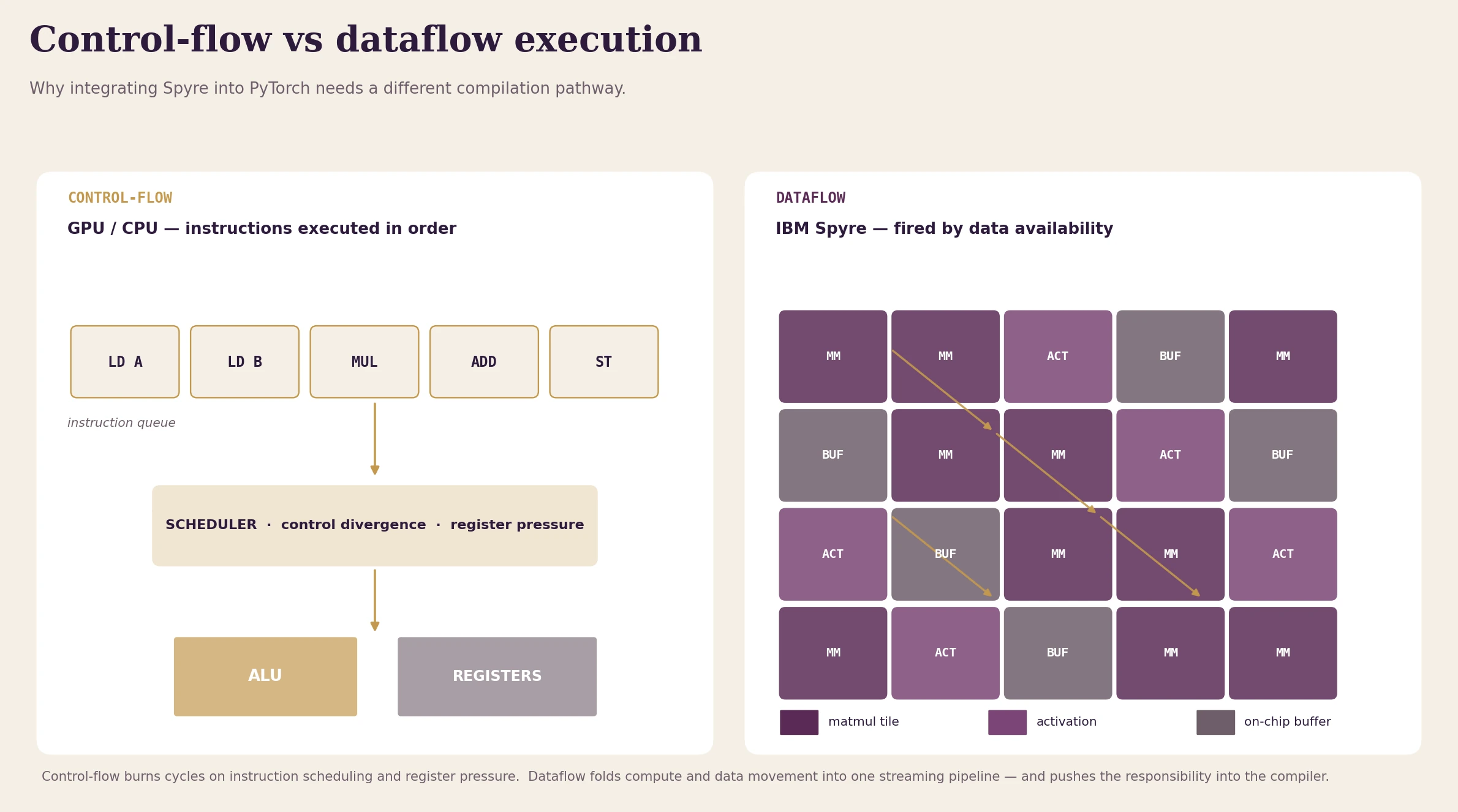 Fig. 2: In a control-flow machine, an instruction queue feeds a scheduler that sends work to ALUs and registers; computation runs at the speed of instruction issue. In a dataflow machine, a neural network graph is placed onto a spatial layout of compute units and on-chip buffers, and computation runs when its inputs are ready.
In a dataflow machine, a neural network graph is placed onto a spatial layout of compute units and memory buffers. Instead of executing a sequence of instructions, computation runs when its input data is available. Tensors move through the hardware graph, activating operations as their inputs become ready. This removes a lot of the overhead that traditional processors spend on neural network workloads: instruction scheduling, control divergence, and register pressure. The hardware can run closer to a streaming pipeline where computation and data movement are closely linked.
The cost is in the software stack. The compiler and runtime are much more important than they are in a kernel-per-op design. They have to analyze the computation graph, schedule data movement across on-chip buffers, and place operations onto spatial resources. Integrating dataflow hardware with frameworks like PyTorch needs a different compilation path than a traditional kernel-based backend.
Part of my work is studying how torch.compile and PyTorch's backend abstractions can support this style of execution. I want graph lowering, scheduling, and operator mapping that fit dataflow hardware [3]. AI tools have been useful for thinking through these design tradeoffs and for studying what a well-integrated dataflow backend should be.
PyTorch and the compiler stack I never trained for
Working on Spyre means understanding the PyTorch stack in detail. I have used Claude often for this. I have studied how PyTorch operates across its layers, from eager execution to Dynamo, AOTAutograd, Inductor, and the full compilation pipeline [2][4].
The compiler part was a real gap for me. I am not a compiler engineer by training, and I am still learning. But my understanding has grown a lot. I can now follow conversations with compiler specialists, work through the stack, and apply the concepts to real problems. That change happened over months of discussion with Claude. Asking questions, getting explanations, going deeper when something did not make sense.
I am still learning the compiler stack. But my confidence has gone from near-zero to genuinely functional, and that change happened in collaboration with AI.
Related to this is how different accelerator backends integrate with PyTorch. CUDA through ATen and the dispatcher is the baseline that most people know. ROCm for AMD [10], Intel's XPU backend via IPEX [9], and Apple's MPS [8] use the same PyTorch abstractions in different ways. Each has different implications for operator coverage, performance, and stack complexity.
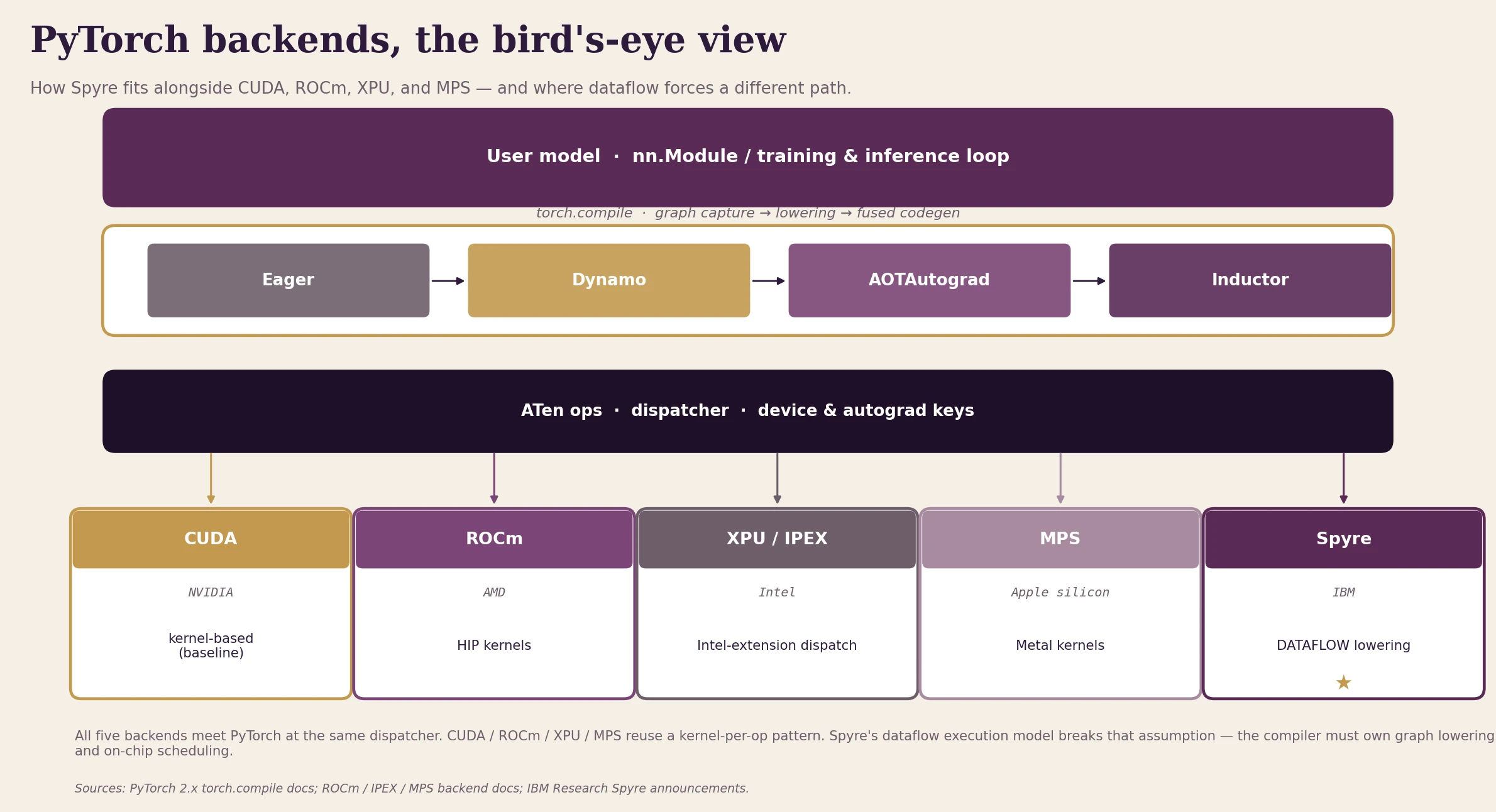 Fig. 3: Five PyTorch backends, all using the dispatcher at the same point. CUDA, ROCm, XPU, and MPS use the kernel-per-op pattern. Spyre's dataflow execution model does not fit that pattern: the compiler must own graph lowering and on-chip scheduling.
For Spyre, those patterns have been directly applicable. I have used Claude to understand how each backend integrates with torch.compile, what the implications are at the Inductor level, and where custom implementations differ from the standard CUDA path. Putting that together from documentation alone would have taken months.
Debugging, code navigation, and Bob inside IBM
Debugging is one of the most valuable use cases I have found for AI tools. For external open-source work, I use Claude. I can paste a failing test, a confusing stack trace, or a section of PyTorch internals and get a structured hypothesis about what is happening and where to look next. That initial triage reduces the time I spend reading logs.
For IBM-internal work, I recently started using Bob, and specifically Bobshell, its command-line interface [6]. It is becoming part of my workflow. Bob is designed to operate inside an enterprise codebase, not as a generic assistant. It understands repository structure and reasons about code in the context of how IBM systems are actually organized. When I am working on the Spyre software stack, that context awareness makes a real difference.
Bob switches between what IBM calls Architect Mode, for scoping and reasoning about system-level design, and Code Mode, for fast and targeted work on specific problems. I prefer Bobshell in particular because it fits how I already work. Terminal-native. Close to the code. Without the overhead of switching context to an IDE plugin.
I am still learning to use it regularly. But having an AI that already knows the internal environment, instead of treating every codebase as an unknown system, is a different experience from a generic assistant.
Building, and teaching, and other work
Outside of code, I have been trying agentic tools like Manus to build my own personal website. Partly a practical project, partly a way to understand the current state of agentic AI. For team work, I use AI for note-taking in long working sessions, so I can stay focused on the conversation instead of splitting my attention between listening and writing.
And there is Columbia. I teach High Performance Machine Learning, and the field changes so fast that what was current when I designed a module can be outdated by the time students take the exam. The challenge is not just keeping up. It is figuring out what actually matters: which signals deserve attention and which are noise. I use Claude to check my course materials, find new developments, and decide what is worth introducing.
The goal of the course is not to teach the tools that exist this semester. It is to give students a solid conceptual foundation, the mental models that will still be useful when today's tools are obsolete. Reasoning about memory bandwidth, parallelism, dataflow, and the algorithm-hardware contract does not become outdated the way framework APIs do. I wrote about that argument in detail in Why Every AI Engineer Needs to Understand Hardware and The Hardware-Software Co-Design Imperative.
What changed in how I work
There is an old African proverb: if you want to go fast, go alone; if you want to go far, go together. AI has removed that tradeoff for me. I work faster than I did alone, and I cover more topics than I could without a collaborator.
The change I did not expect is how much it affected my willingness to study new things. When you can get a quick, accurate overview of an unfamiliar problem, you are more likely to start working on it. I take on harder problems now. I read papers outside my immediate area. I prototype ideas I would have set aside as too time-consuming.
The PyTorch compiler work is the clearest example. I had avoided that area for a long time because the unfamiliarity was too high. Having an AI that was willing to explain the same concept multiple ways, without judging me for not knowing it, changed that. The same is true in my teaching. The ongoing conversation is what makes it possible to stay current instead of always being behind.
With hardware architecture research, the change is about being able to go broad and deep at the same time. I can study more topics without losing the ability to go deep when something matters.
Where the tools have limits
Anywhere context is highly specialized or proprietary. For Spyre-specific details, the accumulated reasoning about why a particular architectural decision was made, the model does not have that context, and it can produce answers that sound plausible but are wrong. You have to know enough to recognize it. I treat AI outputs as first drafts and hypotheses, not conclusions.
I have seen this directly with Bob. When I use it to find where a bug originated, it makes mistakes. You have to guide it, add more context, and use your own domain knowledge. The tool reduces what you need to look at. The judgment is still yours.
The same is true in current research. Models are good at explaining well-documented systems and established ideas. In current research, where behavior is emergent and underdocumented, you still need to experiment and verify.
AI gets you most of the way. The last mile requires hands-on judgment you can't offload.
And in any communication where relationships are involved, like stakeholder updates, team retrospectives, or difficult feedback, tone and context are still your responsibility. AI gives you a draft. You decide what it means and how it is received.
If you are starting out
Start with a real problem, not a demo. Pick something you do regularly that is hard for you (a codebase you have been avoiding, a domain you have never felt confident in, a stack of papers you have been putting off), and use an AI tool on that specific thing. Do not try to evaluate AI in general.
A few starting points by kind of work, not by model. For long step-by-step reasoning and complex debugging, I use Claude. For quick exploration of unfamiliar areas, multi-tool workflows, and first-pass synthesis, I use ChatGPT. For very large document sets and cross-document reasoning, Gemini's working context is the right tool. For IBM engineers working inside internal repositories, Bob and Bobshell are integrated with the repository in a way a generic assistant is not. And for code-heavy daily work in your editor, GitHub Copilot or Cursor put assistance directly in the editor.
Treat it like bringing a fast, well-informed collaborator into a project, not like asking a database.
Give it real context. The output quality is directly proportional to how much intent and background you provide. Explain what you are trying to achieve and why. The more you treat it like a collaborator, the more useful it becomes.
And pay close attention to where it has limits. That is where you learn the most. The goal is not to replace your judgment. It is to have more time and mental energy to apply it where it matters most.
References
[1] Sascha Brodsky, IBM Think, "How AI is changing engineering work," 2026.
[2] PyTorch Foundation, "PyTorch 2.0 release: torch.compile, Dynamo, Inductor."
[3] PyTorch documentation, "torch.compiler — graph capture, lowering, and codegen."
[4] PyTorch documentation, "TorchDynamo overview."
[5] IBM Research, "The Spyre Accelerator on IBM Z."
[6] IBM, "Bob — IBM's AI development partner."
[7] Google, "Long context windows in AI models."
[8] PyTorch documentation, "MPS backend on Apple silicon."
[9] Intel, "Intel Extension for PyTorch (IPEX) — XPU backend."
[10] AMD, "ROCm for AMD GPUs."
Discussion
Sign in with GitHub to leave a comment or react. Threads are public and live in this site's GitHub Discussions.